Monday, December 17, 2018

dUFOs

dUFOs

Save the World from the Invasion of Stupidity!


Earth is in trouble! The dUFOs from the planet Stupidity have launched bombs!
Use what you have learned in your class to disarm the bombs as soon as possible!

With this downloadable game you can create as many questions as you want with corresponding answers. (Note, students will have to provide the correct answers exactly as you type them.)

Originally designed as a multiplayer game, this game is currently functional only as a single-player game. However, it does work well in that regard! You can enter as many questions and answers as you want. Then you can decide how many to display in a round. (How many bombs are there?!)

When a student gets an answer right, they have disarmed that bomb and it disappears. They have unlimited attempts with all bombs. The first half of the bombs will be multiple choice questions and the second half will be fill-in-the blank questions.

Wednesday, August 15, 2018

How to design educational games

(This post will eventually contain more content.)

For now, here is the link to the slideshow I gave at NSU's Community and Collaboration Day in the fall of 2018.

Thursday, May 24, 2018

How to get data from Random Spanish

Random Spanish Data Collection

(If you don't know what Random Spanish is, see this earlier blog post.)

So, you've decided to use Random Spanish. Great!

And now, in order to get more out of it, you want to be able to have your students send you their scores. Well, there are some initial setup things you need to do, and the output isn't ideal, but you can definitely get the data you need and use it!

Warning! These steps can be a little intimidating if you're not used to this sort of thing. But you can do it!

Here are the steps that you need to follow:

1. Create a copy of the Google Form located here.
     - Note: The form must be created in a default google account. (This will not work with special google accounts, such as ones provided by your university.)


2. Create a copy of this document to share with your students.


3. Get the address for the form. You will need to share this with your students. Wait! Stop! It's not the one you're thinking of! First, you need to open the form (NOT the form editor):


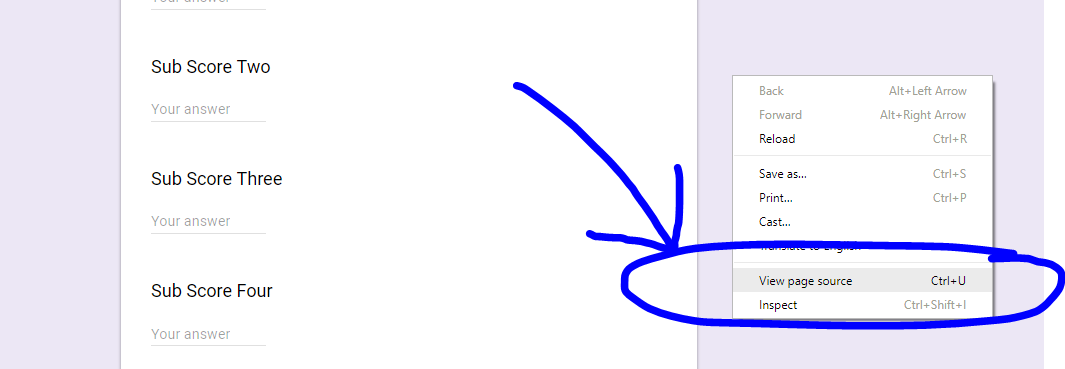
Then you need to right click off to the side, and select "View page source":


Ahhhhh! It looks so scary! But no worries, just do a search for the phrase "form action", and copy the next thing in quotations (don't include the quotation marks). It will start with "https:" and end with "/formResponse":


Paste this into the spreadsheet next to "Form Address".

4. Get the addresses for the fields. To do so, go back to the form (NOT the form editor), and right click in each answer field one at a time and click "Inspect". You need to copy down the part that says "entry." followed by several numbers:


Paste this into the spreadsheet next to Entry 1.

Repeat this step for all 7 answer fields.

5. Share the spreadsheet with your students. Make sure that they know it is vital that they copy and paste each field exactly, or their output will not be sent to you.

Here are the steps that your students need to follow:

1. Open the spreadsheet, and open the game.
     - If they haven't played Random Spanish on the computer they are using before, the screen for them to input their info should automatically pop up.


If it doesn't, they just need to click Back:


and Edit my Info:


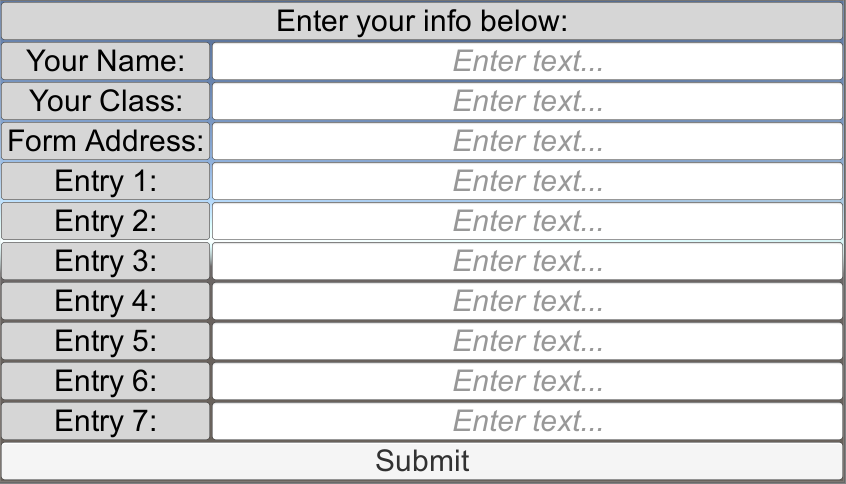
2. Then they just need to fill out the form with the data from the spreadsheet and click Submit:


2.5. Note that students should always double check to make sure that their name is correct! If they use a computer after someone else (e.g. in a lab), then only the user data for the most recent student will be stored in the game!

That's it! Now, when your students are using Random Spanish, and they are ready to submit their scores, all they have to do is click on the "Submit Level Scores" button:


And their scores will show up within a matter of seconds on your spreadsheet!


I hope that this walkthrough has been helpful. If you have any questions or concerns, please feel free to let me know!

Happy learning!

Friday, May 4, 2018

Characteristics of Good Classroom Games


Characteristics of Good Classroom Games

Games can be a great way to engage learners in the material you are covering in class! On the other hand, you don't want to waste any of your precious classroom time. So, here are some characteristics of good classroom games that I've come up with to help me create and select games for my classes:

1. Simple - You should be able to explain the instructions for your games in less than one minute. Two at the most, if the game is otherwise really awesome.
- Why should you care? If a game takes longer than one or two minutes to explain, you'll spend most of your time repeating instructions, instead of actually using the game to go over material. The game may be really fun and educational, but if you only get to play it actively for 10 minutes, it's probably not worth it.

2. Easy - The mechanics of playing the game should be straightforward. If you have to have more than one tab open on each computer, or if you have to bring in a lot of extra hardware, then the game is probably just too darn messy.
- Why should you care? Games that have a lot of stuff going on have a lot more opportunities for failure, confusion, and frustration. Hardware and software issues happen, but you can minimize their probability if you minimize how many pieces there are that can fail.

3. Useful - The game should require learners to use what they are learning in order to succeed in the game. Some games have the target content provided as "fun" on-the-side information, but learners can ignore it and succeed just fine at the game. You don't want that.
- Why should you care? In general, learners will take the path of least resistance to the level of success they want. So, if they don't need to pay attention to the educational part of the game in order to win the game, they won't. And you have just wasted class time.

4. Ceaseless - The game should require students to pay attention constantly. Learners should not be able to be successful if they let their minds wander from the game for extended amounts of time. Games should never focus in on just one group (or, heaven forbid, one student) at a time.
- Why should you care? If only one group/student needs to pay attention on their turn, it is extremely likely that none of the others will do so. (Remember, path of least resistance.) You may think that they'll want to pay attention on other students' turns so that they can be better prepared for their turn, but they won't. Remember, in general our students' goal is not to learn the material, but to get the grade. We need to make those the same thing.

5. Engaging - The game and its consequences need to motivate learners to do well. They need to care about saving the princess, getting the highest score, finishing the maze, etc. Usually this is achieved by having the game provide feedback (e.g. sounds, points, levels, etc.) and by having success in the game lead to a reward outside the game (e.g. when you get 1000 points you can take a nap.)
- Why should you care? If doing well at the game doesn't give the learners some feeling of accomplishment (e.g. sounds, points, etc.) and doesn't lead to any reward outside of the game, then the learners are not likely to try hard.

Remember, games can be great learning tools! But that doesn't mean that all games are great learning tools. Hopefully these characteristics of good classroom games will help you identify / create the types of games that will help your learners master the material you are teaching them.

Wednesday, February 28, 2018

Random Spanish


Random Spanish is an Educational Technology designed to help beginning students of Spanish practice different grammar principles of Spanish with randomly generated content.

Random Spanish helps you practice Spanish by:

- Focusing on one thing at a time - All the prompts in Random Spanish are focused around one specific grammar point.

- Going from input to output - With each grammar principle you start out with the game providing you with the input you need in order to start to learn the material. As you become more comfortable with the material, you can switch to harder modes where you are asked to provide the output.

- Having a focus on form - Each prompt and its associated activity is designed so that you can only get the item right if you correctly understand the grammar.

- Being meaningful - By earning points when you get things right, trying to get them right has more meaning.

- Providing instant feedback - Random Spanish lets you know right away whether you got something right or wrong. It also shows you what the right answers were.

- Allowing for unpredictable repetition - The main feature of Random Spanish is that it generates each prompt randomly each and every time. This means that you can't memorize the game content. Which means you are forced to pay attention in order to succeed.

You can play Random Spanish online for free here.

You can also download either a Windows or Mac version of Random Spanish here.

You can choose which grammar point you want to practice:


You start out simple, with multiple choice questions:


You work your way up to more advanced fill in the blank questions:


Please feel free to try out Random Spanish using one of the methods above!
After you've tried it out, I would love for you to provide me with feedback about it using this form!
 - What do you like?
 - What don't you like?
 - What new content would you like to see added?
 - Did you encounter any issues/bugs with Random Spanish?
 - Etc.

Finally, here is the PowerPoint that I used when presenting about Random Spanish at SCOLAS 2018.

Also, see this blog post for instructions on how to get data from your students when they use Random Spanish!

Thursday, September 14, 2017

How to run my custom games

Windows:


1. Use the link to go to the Google Drive folder. If there is more than one version of the game, make sure that you are going to use the Windows version. (You can hover over the files to see their names. The Mac version will say "Mac" in it.)


2. Download the compressed file. Do NOT double click on the file to go inside it!


3. Open the folder where the file is stored. Click on Extract on the top.

4. Click on Extract All.

5. Click on Extract.

6. You should now see a folder and a file. Double click on the file.

7. Click on Run.

8. I recommend that you play these games in "Windowed" mode in order to make it easier to navigate between the game and the internet. Click on Play. And the game should start!


-------------------------------------------------------------
-------------------------------------------------------------

Mac:


1. Open the System Preferences in Dock.


2. Open the Security and Privacy Tab.


3. Make a note of what your security setting is. Change the setting to allow apps to be downloaded from anywhere.

4. Download the Mac version of the game.

5. The game will now download and play, but the first time you open it the system will ask: "Are you sure?" Just click "yes".

6. For security reasons, AFTER you have run the game the first time, be sure to go back and change your security settings to what they were before.

Thursday, August 10, 2017

Group Competition

At Northeastern State University's Community and Collaboration Day for the Fall of 2017, and at the OFLTA Fall Conference of 2017 I am giving a presentation titled:

Engaging Learners with Group Competition: Tools and Techniques


In this blog post I will walk through this presentation for the benefit of those who couldn't attend the presentation (or for those who couldn't get enough of it.)

(Most of the resources referenced in this presentation can be found in this shared Google Drive folder.)

Why group competition?
 - The main benefit of using group competition in our classes is that it engages students.
    - They pay more attention.
    - They try harder.
    - And, as a result, they learn more!

Student reactions
- I have been using long-term group competition in my classes for years.
- Many students react very positively to the use of long-term group competition. They think it is fun!
- A few students react (very) negatively to this approach. They either feel it is pointless, distracting from the actual learning, or they just don't like working in groups.
- Some students don't really seem to care one way or another.
- But, whether it's from enjoying the competition or from peer pressure to help the group, most students are more engaged in class as a result of group competition than they otherwise would be!

Creating groups

- I create the first set of groups on the first day of class. (This means that often there is some shifting needed in the groups within the first week or so due to students adding and dropping the course. But I feel it is worth it to get the students engaged and used to this approach as soon as possible.)
    - The first set of groups is usually created completely randomly. I usually assign each student a random number, sort the list of student names by this random number, and then just start plugging them into groups. I usually try to keep the groups at around 4 students per group. That way there aren't so many that students can just sit in the shadows and do nothing, but not so few that if a student or two is missing on a given day that those in attendance feel abandoned.
    - I usually create new groups either every half of the semester or every third of the semester, depending largely on the size of the class. (Smaller classes get switched up less frequently.)
    - For the second set, third set, etc. of groups, I usually arrange the students by current grade in the course, and then start building the groups. Trying to ensure that talent is equally spread among the groups, and that students are with as many new groupmates as possible.
    - I also have a strict policy of not playing favorites. (i.e. you can't pick your own groups.)

Rules about points
- Usually I allow groups to earn points in two primary ways:
    - Getting good grades
        - For example, the group that got the highest average quiz score might get 50 points, while the group that got the second highest average quiz score might get 40 points. This method also ensures that it is impossible for students to calculate each others' grades based on group scores.)
    - Participating well in class
        - I play a lot of games in my classes. Pretty much all games have ways for groups to earn points. (e.g. by winning.)
- Groups can usually only lose points in two ways:
    - Poor attendance: If you're not there, your group loses points.
    - Un-participation in class: If you're disrupting the class, I will dock your group some points.
- Interaction with grades: I have another strict policy that, while students' grades can affect group scores, group scores can never affect students' grades. This way students that got stuck with a lousy group don't feel like their course grade was affected by that placement.

Earning points during class

- Worth mentioning at this point is one method that I frequently employ with this approach of group competition: Google Forms.
    - At the beginning of each semester, I create a Google Form (called Quick Questions) with just two questions: Your group name, and your answer. This form is located in an easy to find place on the LMS. (Here is a sample form.)
    - During many games (and other activities), I will ask my students a question and direct them to answer the question using Quick Questions. They do so using their personal smartphones, tablets, or laptops.
    - After all groups have answered the question, I have instant results on the Google Spreadsheet that accompanies the Google Form. (Here is the sample spreadsheet that accompanies the sample form.) This allows us to compare answers quickly and easily as a class. Usually I either give points for all correct responses, or, in the case that everyone got a correct response, for the first one, two or three correct responses (depending on the number of groups.)

Tracking points during class

- I like things to move quickly in my classes, and I don't like getting bogged down by keeping track of group scores on a spreadsheet or (heaven forbid) by tallying them on the board. It's just too time consuming. So, I created a simple little program that allows me to track scores with just a mouse click. (This program is freely available for download here.)
- After you download the zipped folder, simply extract it and run the exe file.
- The first time you use it you will need to name your class and the groups. Then save it! The next time you use that computer, simply run the exe file, and your groups will be ready to go.

Tracking points over the semester
- Now, while the Score Keeper program I've developed works great in class, I like to have my scores saved on the cloud, rather than on an individual machine. So I use a Google Spreadsheet to keep track of all group scores. (Here is a sample Group Scores spreadsheet.)
- To set up the spreadsheet, plug in all the student and group names, and decide which categories to use for giving points.
- After anything is completed (e.g. a test, a class day, etc.) I input the points into the spreadsheet.
- The first tab on the spreadsheet is just a summary chart, which is what I show to students.
- The second tab is where all the group points are broken down and input.
- I like to show the chart to the students on a regular basis, to help keep them engaged in the competition.

Final rewards

- Tangible: I always provide some tangible reward to the winning group when the half or third of a semester ends. Usually this takes the form of chocolate chip cookies. You'd be amazed how intense college students can get when it comes to winning a couple of cookies!
- Intangible: Even when there are students who don't like (or are allergic to) cookies, they still get the intangible reward of winning the competition. And you better believe that they enjoy it! There is often cheering in my class on the day that the winning group is announced.
- Indirect: Even the groups that didn't win get the reward having been engaged more with the material and the class throughout the competition, and thus having (hopefully) learned the material better. This is, in my opinion, the biggest reward, and the one that the students often overlook.

As always, if you have any questions or comments, please feel free to share them below, and/or to email them to me.

Happy Learning!

(You can access the PowerPoint used for this presentation here.)